Character encoding correction and BOM
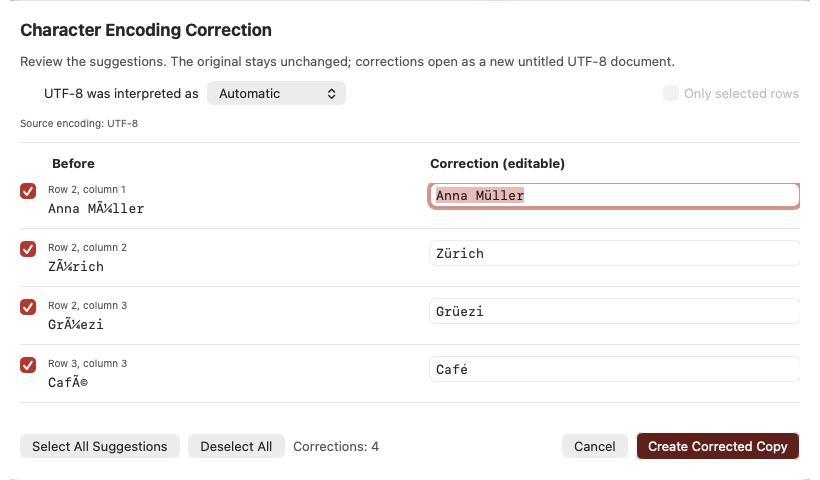
If text appears as Zürich instead of Zürich, it may have been read using the wrong character encoding. Komma CSV offers possible corrections for you to review.
Review and select corrections
- Optionally check the affected rows first.
- Open Edit → Character Encoding Correction… or click its toolbar icon.
- Compare Before with Correction (editable).
- Check or uncheck individual suggestions. You can edit the proposed text directly.
If rows are selected when you open the dialog, Only selected rows is initially enabled. Without this restriction, the entire document, including the header, is scanned. Select All Suggestions selects every changed proposal; Deselect All clears their checkboxes. Review ambiguous suggestions before applying them.
Choose the appropriate encoding
Start with Automatic under UTF-8 was interpreted as. Automatic correction checks common Windows-1252 and ISO-8859-1 mix-ups. If needed, select an encoding explicitly, such as Mac Roman.
If the source file was opened using an assumed Windows-1252 encoding, an additional Original file encoding selector appears. Use it to reinterpret the original bytes as, for example, Mac Roman.
Changing the encoding or row restriction recalculates suggestions and resets their selection and manually edited proposal text. Set these options first, then edit the suggestions.
Recognise lost characters and BOM issues
A BOM (Byte Order Mark) is a normally invisible marker at the start of a file that helps identify its Unicode encoding. If read incorrectly, it may appear as characters such as  at the beginning of the first cell. Conflicting or repeated markers can also cause problems. Komma CSV recognises several such cases and offers Normalize encoding / BOM in the new copy when applicable. For the save option, see Import and export CSV formats → Understand encodings and BOMs.
The replacement character � can indicate that the original information has already been lost. Komma CSV cannot reliably guess those characters. Review the flagged locations and enter the correct text yourself. No suspicious characters found does not guarantee that every value is correct.
Create a corrected copy
Click Create Corrected Copy. Komma CSV opens a new UTF-8 document with an initial name such as Untitled. Only checked proposals that actually change text are applied; correction leaves the source document unchanged. The copy includes the current table contents, including any edits already made.
Press ⌘S to choose a separate filename and location. If only encoding or BOM normalization is required, you can create a copy without individual text corrections. Cancel closes the review without creating a copy.